
ConnectCode MICR E13B Font
ConnectCode MICR E13B is a Magnetic Ink Character Recognition fonts package based on the MICR E13-B industry standard. The font adheres strictly to ISO 1004:1995 specification, a widely accepted standard in the US, Canada, Australia, and many other countries. The character set comprises of ten numbers (0..9) and four special symbols (Amount, Domestic, BSB, and Dash).
ConnectCode MICR E13B Font is a professional and comprehensive package that contains over 60 MICR E13B fonts. This includes the following:
- For use in Microsoft Windows, macOS, and Linux environments.
- Calibration fonts - For overcoming printer misalignment or toner problems. These fonts can be found in the CalibrationFonts subdirectory.
- PostScript fonts - For supporting high-end imagesetters. These fonts can be found in the PostScript subdirectory.
- OpenType fonts - For universal support across different machines, platforms, and locales. These fonts can be found in the OpenType subdirectory.
Magnetic Ink Character Recognition (MICR)
Magnetic Ink Character Recognition (MICR) is a character recognition system widely used in the banking industry for clearing and processing checks. The process involves the use of a stylized font and magnetic ink to print characters such as a check number, sort number, and account number commonly found at the bottom of a check. When the check needs to be scanned, it passes through a special machine, which magnetizes the ink and translates the magnetic information into digital characters. This scanning process is highly secure and more accurate than conventional Optical Character Recognition (OCR).
Using the MICR E13B Fonts
ConnectCode MICR E13B is easy to use and is one of the most comprehensive packages that provides many fonts for different use cases. You can use the default MICR E13B font to get started quickly.
ConnectCode has distributed MICR fonts for many years and has helped many financial institutions and banks with the deployment of their MICR solution. This default MICR font is tuned, optimized, and run on MICR hardware in leading institutions and companies around the world.
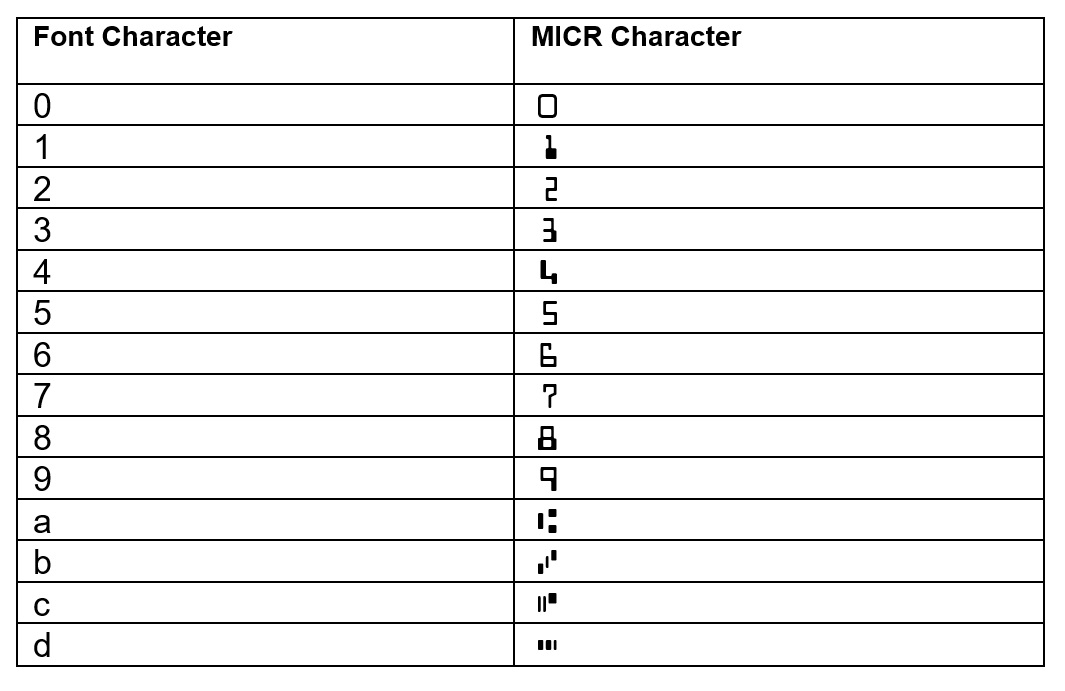
When using the MICR E13B Font, set the font name to CCodeMICR (or CCodeMICRT for the Trial) and choose 12 points for the font size. Enter 0 to 9 for the numeric digits and lowercase a,b,c,d for the special symbols - Amount, Domestic, BSB, and Dash. The character mapping is shown below :
Calibration Fonts
ConnectCode MICR E13B Font has been designed and developed according to the industry specification ISO 1004:1995. The fonts have been tested vigorously on many different MICR hardware types internally and by many different organizations externally. However, depending on the users' printer, paper or toner used, slight misalignment in the characters may still occur. Some printers can also be prone to alignment inaccuracies. Calibration can be performed to improve misalignment (if any) and ensure optimal scanning of the characters.

|
PDF Embedding Support
All the MICR E13B fonts can be embedded into a PDF (Portable Document Format) file without limitations or restrictions.
Adherence to Industry Specifications
All the MICR E13B fonts adhere strictly to the ISO1004:1995 specifications.
Security Fonts
ConnectCode MICR E13B Font provides additional value by including 4 professional security fonts (in the SecurityFonts subdirectory) to print payee names and check amounts securely. Users can choose from the standard form or a form with text printed below each character. The Security Fonts help prevent alteration and forgery.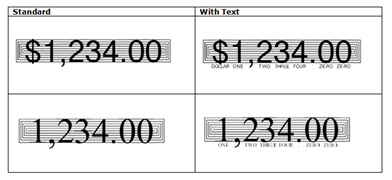
Priority Support and Free Maintenance Upgrade
The MICR fonts package comes with a 1-year maintenance upgrade and priority support.
Platforms Supported
Available for use on Windows, macOS, and Linux.