
ConnectCode Free Security Font
Security Fonts
Security Fonts are used to print text and amounts on secure documents e.g. a bank check. These documents require capabilities to prevent forgery and easy alteration. By providing a unique background pattern of lines, start/stop characters and human readable text that appears below the actual printed text, security fonts provide capabilities to deliver a highly secure document quickly and easily.ConnectCode Free Security Font
ConnnectCode Free Security Font provides users with all the necessary security features while at the same time an excellent control over the look of the documents. Hard to alter check amounts in dollars, pounds sterling, euros, or the yen can be printed easily. Payee names in both upper and lower case characters are supported.Security Font Styles
The following shows the font style that is provided in the ConnectCode Free Security Font package. To use the font, the user can simply select the following font in their favourite text editor like Word or Wordpad.-
Font Name - CCodeSecuritySANS_S
This is a SANS-SERIF security font without the security text below each character.
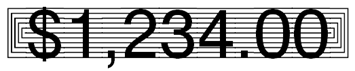
Start and Stop Characters
It is recommended to start and stop each amount or payee name with the start and stop characters. This prevents the addition of digits or text before and/or after the printed text and makes forgery more difficult.- Character - "[" or "{"

-
Character - "]" or "}"

Check Amounts
All the four major currency symbols like Dollar, Pound Sterling, Euro and Yen are supported. The Cent and Currency symbols are also available as part of the fonts.Currency Symbols
- Dollar - "$" (ASCII 36)
- Pound Sterling - "£" (ASCII 163)
- Euro - "€" (ASCII 128)
- Yen - "¥" (ASCII 165)
- Cent - "¢" (ASCII 162)
- Currency - "¤" (ASCII 164)
Space and Underscore
The space character does not have any background pattern lines. It is used as a normal space character as in other text fonts. To add a space with the security background lines, the user is recommended to use the "_" (underscore) character.- Normal Space Character - " "
- Secure Space Character - "_" (see below)

Download ConnectCode Free Security Font
Free Security Font
System Requirements
-
Microsoft Windows 98, ME, NT 4.0, 2000 ,Win XP, 2003, 2008, 2012, Vista, Windows 7
Windows 8 and Windows 8 Pro - 300 MHz processor
- 64 MB RAM
- 5 MB of Hard Disk space
EXE Format (Executables)
ZIP Format (WinZip)
Overview of what the installer does
- Install Word and PDF documents on your system.
- Install True Type fonts on to your system with your permission. During installation you will be prompted whether to allow the installer to copy the fonts into your "C:\Windows\Fonts" folder automatically.
- On your system, go to "C:\Program Files (x86)\ConnectCodeSecurityFree" or the location where the software is installed.
- Double click on Uninstall.exe.
- Click on the "Yes" button followed by the "Uninstall" button. This will uninstall all the fonts and software on your system.
Get the professional version of the Security Fonts or the MICR E13B Font or the MICR CMC7 Font package.