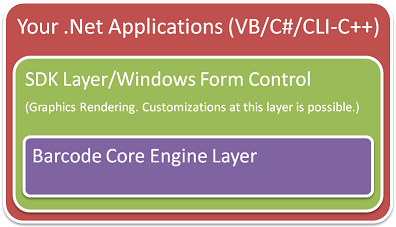
ConnectCodeBarcodeLibrary.dll - This is the main library for used with Reporting Services , Windows Form Application, WPF Application and barcode image generation. This library includes both the SDK Layer and Barcode Core Engine Layer as shown in the diagram below.
WPF\ConnectCodeBarcodeLibraryWPF.dll - This is a .Net 3.5 based, Windows Presentation Foundation (WPF) specific library. The library implements the WPF User Control and allows you to create barcodes easily in a .Net 3.5 application. This library includes both the SDK Layer(based on WPF) and Barcode Core Engine Layer as shown in the diagram below.
Core\ConnectCodeBarcodeCoreLibrary.dll - This is the Barcode Core Engine Layer library. It generates string characters and does not render the barcodes as graphics. Refer to the section "Interpreting the output of the Barcode Core Engine" on how to make use of the results returned by this library.
Samples using the DLL (Samples folder)
Please note that Windows Security might prevent you from performing a compilation in the "Program Files" directory. A copy of the Samples is also placed in the Windows Documents directory by the installer.
WindowsFormsSample - Sample on using the SDK in a Windows Form application. This is a Visual Studio 2005 Project.
VS2010\WindowsFormsSample - This is the WindowsFormsSample wrap in a Visual Studio 2010 project.
WPFSample - Sample on using the .Net 2.0 SDK with a Windows Presentation Foundation application.This is a Visual Studio 2005 Project.
WPFBarcodeControlSample - Sample on using the .Net 3.5 WPF specific library in a Windows application. This is a Visual C# 2008 Express Project.
ConnectCodeBarcodeControl - Reference implementation of the SDK Layer. It also illustrates on how to use the Barcode Core Engine Layer. This sample can be used to customize the SDK layer. This is only available in the registered version of the SDK.
Source Code (Source folder)
This folder contains the source code of the SDK. This will only be available in the Unlimited Deployment (With Source Code) edition of the ConnectCode SDK.
ConnectCodeBarcodeCoreLibrary - Compilable source code of the Barcode Core Engine layer.
ConnectCodeBarcodeSourceLibrary - Compilable source code of the SDK layer and Barcode Core Engine layer.